
From Participation to Cohesion: Measuring Affiliate Health through Engagement Pathways and Network Structure
Overview
Most organizations track who showed up. This project asks what happened after they did.
Working with a synthetic dataset modeled on common patterns in distributed organizations, I designed a dual framework that combines a ladder of engagement with social network analysis to move beyond participation counts and toward a relational understanding of affiliate health. The ladder measures how deeply members are embedded in the affiliate over time. The network measures how members are connected to each other and where the structural risks live. The result is a methodology that makes visible what attendance data cannot: relationships, sustained engagement, and sustainability.
The core challenge was to move from measuring activity to understanding how engagement actually functions within each affiliate. Based on available information, I decided to posit three critera and questions:
The project spans data modeling in dbt, network analysis in Python using NetworkX, visualization in Kumu, and an affiliate health report that translates technical findings into plain language for organizational decision-makers.
Note on data: This project uses a synthetic dataset modeled on common patterns in distributed organizations. The goal is to demonstrate the framework and analytical approach, rather than evaluate a specific organization.
Approach
The goal was to move from counting activity to understanding how engagement actually functions inside each affiliate. To do that, I built a dual framework that combines a ladder of engagement with social network analysis. Neither tool alone is sufficient. The ladder tells you where a member stands in their relationship to the organization. The network tells you how members are connected to each other. Together, they produce a more complete picture of affiliate health than participation data alone.
The project moves through six steps:
1. Define the framework.
2. Build the data model
3. Transform three source tables into one usable dataset. using dbt.
4.Analyze network structure.
5. Visualize the network.
6. Score affiliate and report findings.
Step 1: Define the framework
The framework has two components. The ladder tells you where a member stands in their relationship to the organization. The network tells you how members are connected to each other. Neither is sufficient on its own. Together they produce a more complete picture of affiliate health than participation data alone.
The Engagement Ladder
Members move through the affiliate like steps on a staircase, each level representing a deeper investment in the work and the people around them. The ladder has five levels: Observer, Explorer, Regular, Bridge, and Anchor. A member's level is not self-reported. Instead it is assigned based on two observable signals: how often they attend events relative to how many were available, and how many people they have referred into the affiliate.
| Level | Definition | Example | Attendance Rate | Referral Count |
|---|---|---|---|---|
| Observer | Member, but not attending | Long time listener, first time... well, not yet | 0% | 0 |
| Explorer | Attends occasionally | Shows up when the topic is right | 1-75% | 0 |
| Regular | Engages consistently | You could set your watch by them | >75% | 0 |
| Bridge | Consistent and grows the network | The one who says "you two should meet" | >75% | 1-2 |
| Anchor | Consistent and brings in the most people | The reason half the room is there | >75% | 3+ |
Attendance rate is calculated by dividing the number of events a member attended by the total number of events their affiliate held during their membership period. This accounts for the fact that affiliates vary in how active they are: a member in Phoenix had fewer opportunities to attend than a member in Atlanta, so raw counts alone would be misleading. Referral count is the number of members whose referred_by field points to that member. It measures network growth directly: who is actually bringing people in. Founding members with no referred_by record of their own are not penalized. What matters is whether they are growing the network, not whether someone recruited them.
The Network Layer
Where the ladder asks how connected a member is to the organization, the network asks how connected members are to each other. The network layer sits alongside the ladder as a separate lens, not a replacement for it. A member can be deeply embedded in the organization — attending consistently, referring others in — while remaining isolated from their peers. The ladder would not surface that. The network does.
Why Two is Better Than One
The ladder and the network answer different questions. The ladder tells you about a member's relationship to the institution. The network tells you about a member's relationship to everyone else in it. An affiliate can have strong ladder distribution and a fragile network. It can have a dense network and an engagement distribution weighted toward the bottom. Looking at either one alone produces an incomplete picture. Looking at both together makes visible what neither could show on its own: whether the affiliate is healthy, where the risks live, and what is worth paying attention to.
Step 2: Build the Data Model
The dataset is built from five tables: three source tables that live in BigQuery and two derived tables produced by the dbt pipeline. The distinction matters. Interactions and referrals are not collected directly. They are derived from what members actually did rather than what they reported.
The Three Source Tables
The Members table holds individual profiles: who joined, when they joined, and who brought them in. The referred_by field is stored as a member name rather than an ID, making the data human-readable at the source. The dbt pipeline resolves it back to a member ID for analysis.
The Events table records each affiliate event, its type, and when it took place. The Attendance table records who showed up to what. One row per member per event attended. It is the simplest table in the model and the most analytically powerful, because everything downstream, such as interactions, ladder levels, network structure, is derived from it.
Data Dictionaries
member_idmember_nameaffiliate_idjoin_dateevent_idaffiliate_idevent_nameevent_typeevent_dateattendance_idmember_idevent_idmember_id_1member_id_2affiliate_idco_attendance_countinteraction_weightreferral_idreferrer_idreferred_idaffiliate_idjoin_dateThe Two Derived Tables
The Interactions table is derived from the Attendance table. Two members who attended the same event share a co-attendance record. The more events they share, the stronger the tie. Interaction weight runs from one to five, mapped from the number of shared events. A weight of one looks like two members who crossed paths once. A weight of five looks like two members who keep showing up together.
The Referrals table is derived from the Members table by extracting the referred_by relationship into a dedicated edge list. Each row represents a directed connection: the member who made the introduction and the member who joined as a result. This is the directed network. Arrows point from referrer to recruit.
How the Tables Relate
Together the five tables capture two distinct views of the affiliate. The co-attendance network shows how relationships function in the present. The referral network shows how the affiliate grew over time. Neither view alone is sufficient. Both together tell the full story.
Step 3: Sources Tables to Analytical Dataset
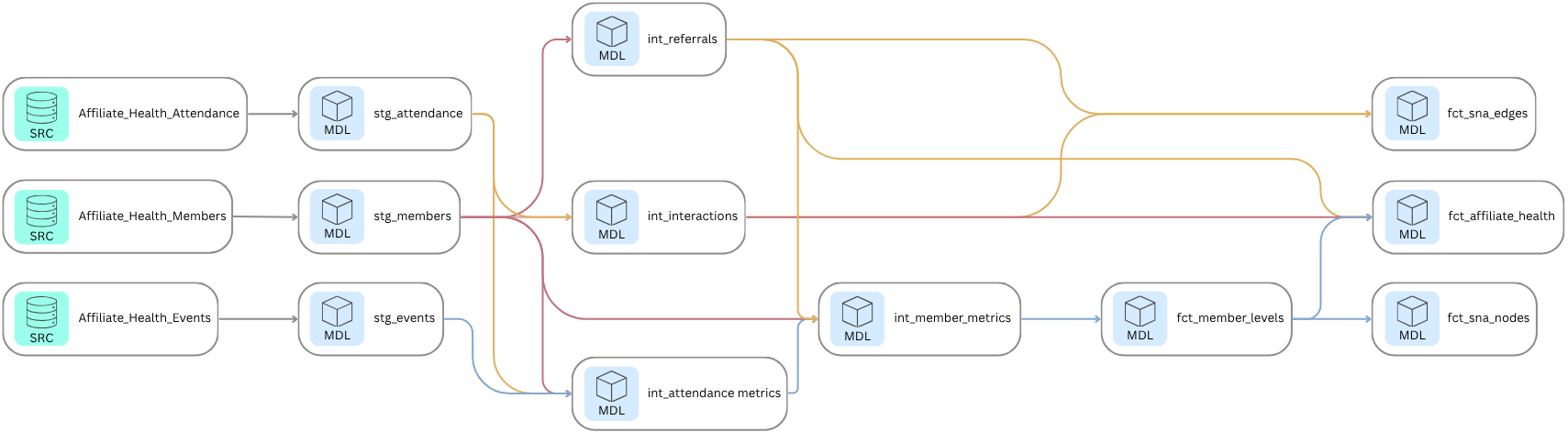
Three source tables entered the pipeline. Two analytical outputs came out. Everything in between is documented, reproducible, and version controlled.
The pipeline is built in dbt and runs against BigQuery. It moves through three layers: staging, intermediate, and marts. Each layer has a specific job. Staging cleans and casts the raw source data. Intermediate derives the analytical building blocks. Marts produce the final outputs used for analysis and reporting.
Staging
The staging layer pulls directly from the three source tables in BigQuery and prepares them for downstream use. Each model casts fields to the correct data types and handles one specific transformation: the Members staging model resolves the referred_by field from a member name back to a member ID via a self-join. This is the only place in the pipeline where that resolution happens, which means every downstream model can treat referred_by as a reliable foreign key.
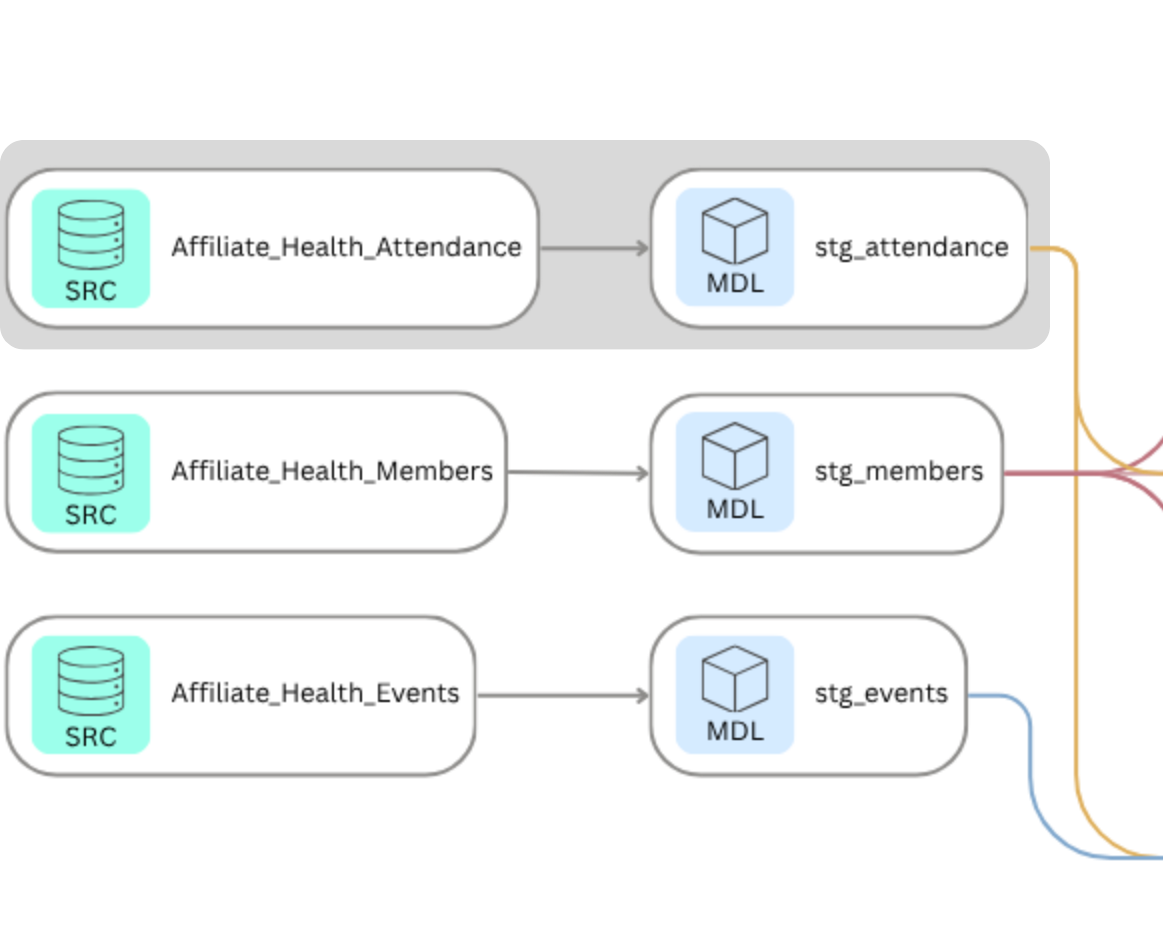
with source as (
select * from {{ source('Affiliate_Health', 'Attendance') }}),
    staged as (select
        cast(attendance_id as int64)    as attendance_id,
        cast(member_id as int64)        as member_id,
        cast(event_id as int64)         as event_id
    from source)
select * from staged;
Intermediate
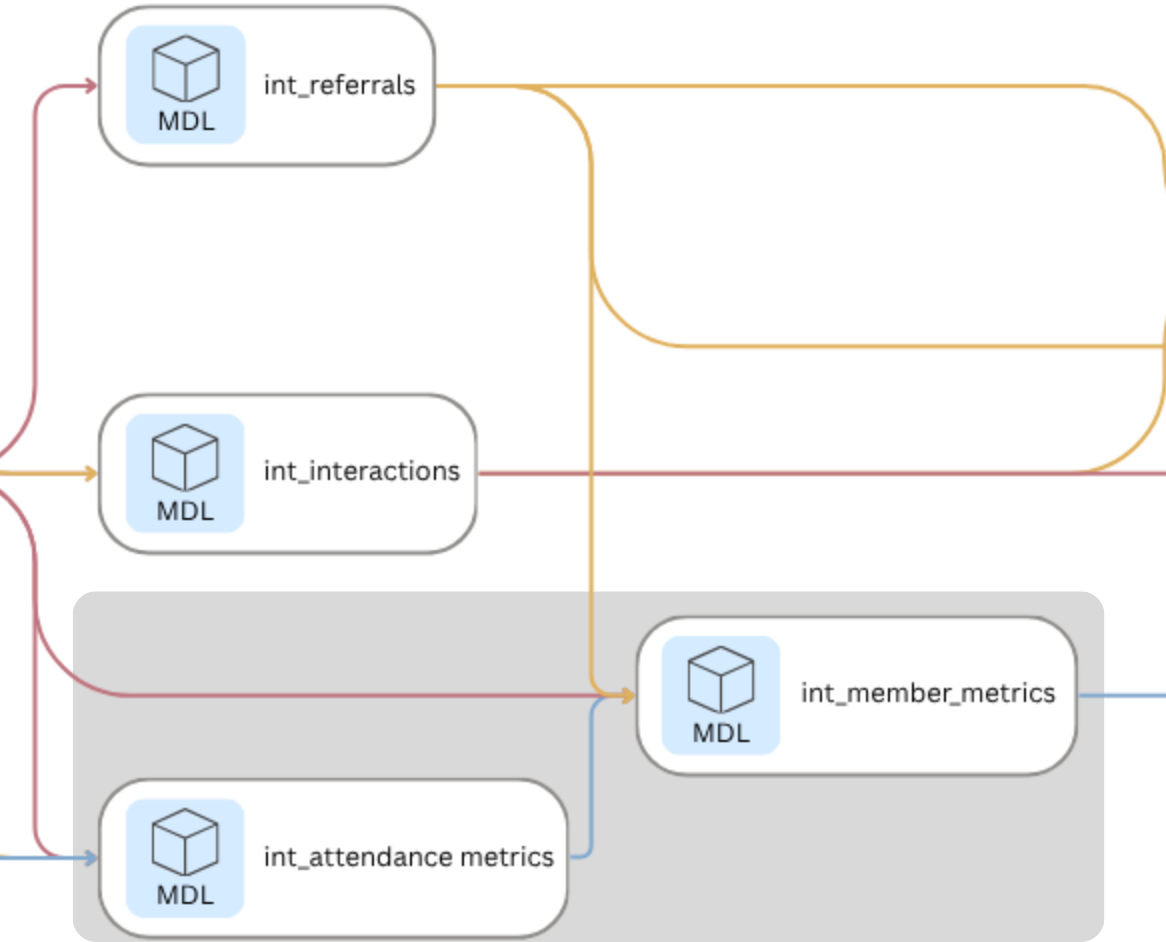
The intermediate layer is where the analytical work happens. Four models build progressively on each other:
- int_referrals extracts the referred_by relationship from the Members table into a clean directed edge list.
- int_attendance_metrics calculates attendance count and attendance rate per member, accounting for variation in how many events each affiliate hosted.
- int_interactions derives the undirected co-attendance network from the Attendance table, assigning an interaction weight of one to five based on how many events each pair of members shared.
- int_member_metrics combines attendance rate and referral count into a single member-level metrics table, which feeds directly into ladder level assignment in the mart layer.
with attendance as (select * from {{ ref('stg_attendance') }}),
members as (
    select * from {{ ref('stg_members') }}),
pairs as (
    select
        least(a1.member_id, a2.member_id) as member_id_1,
        greatest(a1.member_id, a2.member_id) as member_id_2,
        a1.event_id
    from attendance as a1
    inner join attendance as a2
        on  a1.event_id = a2.event_id
        and a1.member_id < a2.member_id),
co_attendance as (
    select
        member_id_1,
        member_id_2,
        count(event_id) as co_attendance_count
        from pairs
        group by member_id_1, member_id_2),
with_affiliate as (
    select
        c.member_id_1,
        c.member_id_2,
        m.affiliate_id,
        c.co_attendance_count,
    case
        when c.co_attendance_count = 1             then 1
        when c.co_attendance_count = 2             then 2
        when c.co_attendance_count between 3 and 4 then 3
        when c.co_attendance_count between 5 and 6 then 4
        else 5
        end as interaction_weight
    from co_attendance as c
    inner join members as m
        on c.member_id_1 = m.member_id)
select * from with_affiliate;
Marts
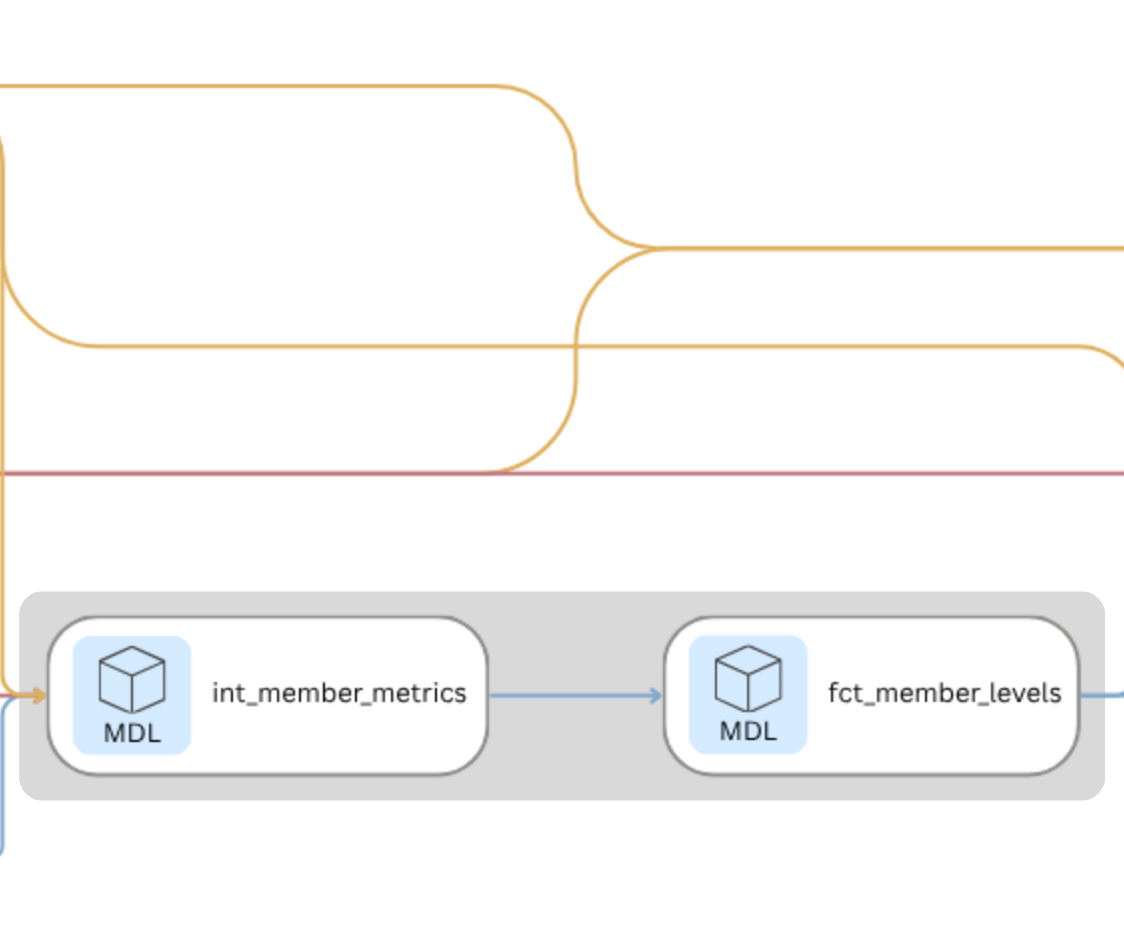
The mart layer produces two final tables. fct_member_levels assigns a ladder level to each member based on the two-signal calculation: attendance rate and referral count. fct_affiliate_health scores each affiliate across three dimensions: engagement distribution, network structure, and referral pattern.
Each member's ladder level is assigned based on two signals: how often they attend events relative to how many were available, and how many people they have referred into the affiliate.
with member_metrics as (select * from {{ ref('int_member_metrics') }}),
leveled as (
    select
        member_id,
        member_name,
        affiliate_id,
        join_date,
        referred_by_name,
        referred_by_id,
        attendance_count,
        events_available,
        attendance_rate,
        referral_count,
    case
        when attendance_rate = 0                                        then 'Observer'
        when attendance_rate > 0     and attendance_rate < 0.75         then 'Explorer'
        when attendance_rate >= 0.75 and referral_count = 0             then 'Regular'
        when attendance_rate >= 0.75 and referral_count between 1 and 2 then 'Bridge'
        when attendance_rate >= 0.75 and referral_count >= 3            then 'Anchor'
        end
        as ladder_level
    from member_metrics)
select * from leveled
Step 4: Analyze Network Structure
The dbt pipeline produces the data. The network analysis produces the insight. Social network analysis (SNA) is a method for studying relationships. It treats people as nodes and the connections between them as edges. The structure those connections form reveals things about the group that individual-level data cannot: (1) who sits at the center, (2) who bridges otherwise disconnected clusters, and (3) where the network is fragile.
The subsequent analysis relies on the following concepts:
| SNA Concept | Explanation |
|---|---|
| Nodes | Represents an individual within the network, in this case the member within the affiliate. |
| Edges | Representes the relationships between two nodes in the network. |
| Degree Centrality | Measures the number of direct connections a node (member) has within the network. A member with high degree centrality is connected to many others. In a healthy affiliate, degree centrality is distributed across multiple members. In a fragile one, it concentrates in a small number of people. |
| Betweenness Centrality | Identifies members who serve as bridges between different parts of the network. A high betweenness score means the network depends on that member to connect others. If that member leaves, those connections break. A score of 1.0 means every path in the network runs through a single person. |
| Network Density | Measures the proportion of actual to possible connections exist in the network. A dense network, score of 1.0, means every member is connected to each other, whereas a score of 0.0 means no one is connected. |
| Components (communities) | A group of members connected to each other but not to anyone outside their group, often used to identify sub-groups within the larger network. |
The dbt pipeline calculated who each member is and how often they showed up (ladder level, attendance rate, referral count), NetworkX takes that output and asks how are they related to each other (density, betweenness, degree centrality, components).
Build the graph
This is where the dbt outputs become the inputs. Members become nodes. Co-attendance interactions become edges, with interaction weight carried forward as edge strength.
import pandas as pd
import networkx as nx

# Filter to co-attendance edges only
    co_attendance = edges[edges['edge_type'] == 'co-attendance'].copy()

# Store affiliate summaries
    summary = []
    for affiliate in sorted(nodes['type'].unique()):
        aff_nodes = nodes[nodes['type'] == affiliate]
        aff_node_ids = aff_nodes['member_id'].tolist()
        aff_edges = co_attendance[co_attendance['affiliate_id'] == affiliate]
# Build graph
    G = nx.Graph()
    G.add_nodes_from(aff_node_ids)
    for _, row in aff_edges.iterrows():
        G.add_edge(row['from_id'], row['to_id'], weight=row['weight'])
# Network metrics
    density = round(nx.density(G), 3)
    components = nx.number_connected_components(G)
    betweenness = nx.betweenness_centrality(G, weight='weight')
    degree = nx.degree_centrality(G)

    top_bc_node = max(betweenness, key=betweenness.get)
    top_bc_name = nodes[nodes['member_id'] == top_bc_node]['label'].values[0]
    top_bc_score = round(betweenness[top_bc_node], 3)
    top_bc_level = nodes[nodes['member_id'] == top_bc_node]['ladder_level'].values[0]

    avg_degree = round(sum(degree.values()) / len(degree), 3)

# Engagement distribution
    aff_levels = aff_nodes['ladder_level'].value_counts().to_dict()
    total = len(aff_node_ids)
    highly_engaged = aff_levels.get('Regular', 0) + aff_levels.get('Bridge', 0) + aff_levels.get('Anchor', 0)
    pct_highly_engaged = round(highly_engaged / total * 100, 1)

# Referral metrics
    aff_referrals = edges[
        (edges['edge_type'] == 'referral') &
        (edges['affiliate_id'] == affiliate)]
    total_referrals = len(aff_referrals)
    unique_referrers = aff_referrals['from_id'].nunique()
    summary.append({
        'Affiliate': affiliate,
        'Members': total,
        'Density': density,
        'Components': components,
        'Avg Degree Centrality': avg_degree,
        'Top BC Node': top_bc_name,
        'Top BC Level': top_bc_level,
        'Top BC Score': top_bc_score,
        'Observer': aff_levels.get('Observer', 0),
        'Explorer': aff_levels.get('Explorer', 0),
        'Regular': aff_levels.get('Regular', 0),
        'Bridge': aff_levels.get('Bridge', 0),
        'Anchor': aff_levels.get('Anchor', 0),
        'Pct Highly Engaged': pct_highly_engaged,
        'Total Referrals': total_referrals,
        'Unique Referrers': unique_referrers})
    summary_df = pd.DataFrame(summary)

# Average co-attendance interaction weight per affiliate
    avg_weight = co_attendance.groupby('affiliate_id')['weight'].agg(
    avg_interaction_weight='mean',
total_edges='count').round(3).reset_index()| Metric | Definition |
|---|---|
| Nodes | Represents an individual within the network, in this case the member within the affiliate. |
| Edges | Representes the relationships between two nodes in the network. |
| Density | Measures the proportion of possible connections that actually exist in the network. A score of 1.0 means every member is connected to every other member. A score of 0 means no one is connected to anyone. High density indicates an affiliate where members are broadly connected. Low density indicates one where connections are sparse or concentrated. |
| Degree centrality | Measures how many connections each member holds relative to the maximum possible. A member with high degree centrality is connected to many others. In a healthy affiliate, degree centrality is distributed across multiple members. In a fragile one, it concentrates in a small number of people. |
| Betweenness centrality | Identifies members who serve as bridges between different parts of the network. A high betweenness score means the network depends on that member to connect others. If that member leaves, those connections break. A score of 1.0 means every path in the network runs through a single person. |
| Components | A group of members connected to each other but not to anyone outside their group. One component means everyone in the affiliate is reachable through the network. More components signal fragmentation: isolated clusters with no ties to the rest of the affiliate. |
With fct_member_levels and int_interactions in hand, each affiliate can be modeled as a graph: members as nodes, co-attendance interactions as edges, and interaction weight as edge strength. The analysis was conducted in NetworkX in Google Colab.
Four metrics describe the structure of each affiliate's network. Together they answer the three core questions this project was designed to address.
The output is a metrics table with one row per member, enriched with degree centrality and betweenness centrality, alongside affiliate-level summaries of density and components. That enriched dataset is what feeds the Kumu visualization in Step 5 and the affiliate health scoring in Step 6.
Step 5: Visualize the Network
The metrics tell you what is happening in each affiliate. The visualization makes it visible. The network maps were built in Kumu, a web-based tool for social network analysis and relationship mapping.
The enriched nodes file from the NetworkX analysis served as the element import: one row per member with label, affiliate, ladder level, attendance rate, referral count, degree centrality, and betweenness centrality. The co-attendance edges served as the connection import, with interaction weight mapped to connection strength so thicker lines indicate stronger ties. The referral edges were imported as a separate connection layer, directed from referrer to recruit. That produces two distinct network views for each affiliate. The co-attendance network shows how relationships function in the present: who is connected to whom and how strongly. The referral network shows how the affiliate grew over time: who brought whom in and whether that activity is distributed or concentrated.
Node color reflects ladder level, using a consistent palette across all five affiliates so the maps are directly comparable. Node size can be scaled to betweenness centrality, making the bridges and bottlenecks immediately visible without reading a single number. The visual contrast between affiliates is stark even before any decoration is applied. Atlanta's map is dense and distributed. Chicago's is a hub and spoke with one node at the center of everything. Denver fractures into disconnected clusters. The structure of each affiliate is legible at a glance in a way that a metrics table never is.
Step 6: Summary Affiliate Health and Report Findings
The pipeline, the network analysis, and the visualization all build toward one output: a health profile for each affiliate that names what is working, what is fragile, and where the risk lives. Each affiliate is evaluated across the three questions from earlier:
These three questions do not produce a single score. A number would flatten what is actually a nuanced picture. Instead each affiliate receives a health profile that holds all three dimensions together and names what they reveal in combination.
The five affiliate health reports
The findings are documented in five affiliate health reports, one per affiliate, each structured around the same three questions. The reports are written in plain language for organizational decision-makers rather than data practitioners. The goal is not to present the methodology but to surface what it found and what it means for the affiliate.
[Link or embed to the five affiliate health reports]
The five affiliates were designed to represent distinct health profiles: Atlanta as the healthy baseline, Chicago as a leader bottleneck, Denver as fragmented, Seattle as moderately healthy, and Phoenix as emerging. The contrast between them is where the framework earns its value. Headcount alone would not distinguish these five affiliates. The combination of connectivity, sustained engagement, and dependency risk makes the differences visible and makes the risks actionable.
Comparing Affiliates
The five affiliates in this dataset were designed to represent distinct health profiles. The contrast between them is where the framework earns its value. Headcount alone would not distinguish these affiliates. The combination of connectivity, sustained engagement, and dependency risk makes the differences visible and the risks actionable.
| Affiliate | How Connected? | Is Engagement Sustained? | Where is the Risk? |
|---|---|---|---|
| Atlanta | High density, 2 components | 72% highly engaged | Low — risk distributed across 9 referrers |
| Seattle | Moderate density, 3 components | 57% highly engaged | Moderate — some dependency risk |
| Phoenix | Low density, 5 components | 33% highly engaged | Emerging — thin but not broken |
| Chicago | Low density, 1 component | 7% highly engaged | Critical — one person holds the entire network |
| Denver | Very low density, 7 components | 0% highly engaged | Severe — fragmented with little to no path to reconnection |
Atlanta and Chicago tell the starkest story. Both have 15 or more members. Both have active referral networks. But where Atlanta's connections are distributed and its engagement runs deep, Chicago's entire network runs through one person. Remove that person and the affiliate has no connections at all. That is the difference between a healthy affiliate and a fragile one, and it is invisible in a headcount report.
What Makes this Possible
Participation data tells you who showed up. This framework tells you what happened after they did. That shift, from counting activity to understanding how engagement actually functions, is what makes the difference between a report that describes a problem and one that names where the risk lives and what to do about it.
For a federated organization managing multiple affiliates, that distinction matters. A headcount report treats all affiliates as comparable. This framework makes the differences visible. An affiliate with 15 members and a density of 0.889 is not the same as an affiliate with 15 members and a density of 0.133. One is resilient. The other is one departure away from collapse. Without a relational lens, both look the same in a spreadsheet.
What it makes possible in practice
Early risk identification. A bottleneck or fragmentation signal surfaces before a key member leaves, not after. The framework gives organizational leaders time to act rather than react.
Targeted support. An affiliate weighted toward Observers and Explorers needs different support than one weighted toward Regulars and Bridges. Knowing where members stand makes it possible to design interventions that meet affiliates where they are.
Leadership succession planning. When betweenness centrality is concentrated in one person, that person's departure is a structural risk. Naming that risk explicitly creates the conditions for intentional succession planning before it becomes a crisis.
Referral strategy. Knowing which members are bringing others in, and whether that activity is distributed or concentrated, makes it possible to invest in the right people rather than assuming growth will happen organically.
Take it Further
This project uses a synthetic dataset to demonstrate the framework. Applied to real organizational data, the methodology becomes a repeatable evaluation tool. A few directions worth exploring:
Tracking change over time. Running the analysis at regular intervals would surface whether affiliates are growing healthier or more fragile, and whether interventions are having the intended effect.
Integrating survey data. Co-attendance captures whether members showed up together. It does not capture the quality of those interactions. Pairing the network analysis with a short relational survey would add a layer of depth that attendance data alone cannot provide.
Building a live dashboard. The dbt pipeline is already running against BigQuery. Connecting it to a visualization layer would make the affiliate health metrics available in real time rather than as a periodic report.
The framework is designed to be extensible. The ladder levels, the interaction weights, and the health dimensions can all be adjusted to reflect the specific context of a given organization. What stays constant is the underlying question: not who showed up, but what happened after they did.
